Actions
Issue #2032
open
DC
Make thunderbird work with our contact address
Issue #2032:
Make thunderbird work with our contact address
Start date:
06/04/2020
Due date:
% Done:
0%
Estimated time:
Upstream patch status:
Work not started
Grant:
Type of work:
Any programming languages (scripts, C, etc), System administration
Files
| add-mail-1.png (19.5 KB) add-mail-1.png | add mail step 1 | ||
| add-mail-2.png (39.5 KB) add-mail-2.png | add mail step 2 | ||
| server-settings.png (107 KB) server-settings.png | server settings |
DC Updated by Denis 'GNUtoo' Carikli about 6 years ago
Thunderbird currently doens't support this mail setup.
There is a bug report about it on the Mozilla Bugzilla.
The status right now is to wait for comments, and if we don't get any on that we could try to implement the feature and then see if we have more comments once it's done.
If it's not possible to fix upstream then it could become complicated:- Having FSDG compliant distributions maintain one more patch for that feature would probably not be a good idea. However if we manage to get the patches in many distributions, upstream would probably have some interest in supporting such feature.
- We could also implement relaying the mails to the users existing mail address, hoping that the system cannot be abused to send arbitrary mails to other addresses. GNUtoo never did that so he's not confident in doing that in a production system. Having the system being abused due to lax security is probably not an option as it could result in major inconvenience for both the FSF and the organization(s) kindly giving them the IP addresses and the network.
- We could also change mail server, assuming that someone else than GNUtoo shows up to do the job.
- We could also try to migrate to Trisquel 9 along the way to run a more up to date mail server
DC Updated by Denis 'GNUtoo' Carikli about 6 years ago
- Estimated time set to 2031:00 h
DC Updated by Denis 'GNUtoo' Carikli about 6 years ago
- Estimated time deleted (
2031:00 h) - Parent task set to #2031
- Hosting infrastructure Redmine instance @ OSUOSL added
- Hosting infrastructure deleted (
VM @ FSF)
DC Updated by Denis 'GNUtoo' Carikli about 6 years ago
- Hosting infrastructure Upstream projects added
- Hosting infrastructure deleted (
Redmine instance @ OSUOSL)
DC Updated by Denis 'GNUtoo' Carikli about 6 years ago
- Subject changed from Make thunderbird with our contact address to Make thunderbird work with our contact address
DC Updated by Denis 'GNUtoo' Carikli about 6 years ago
- Category set to Patch upstreaming
- Hosting infrastructure VM @ FSF added
- Hosting infrastructure deleted (
Upstream projects)
DC Updated by Denis 'GNUtoo' Carikli about 6 years ago
- Project changed from Replicant infrastructure to Upstreaming patches
- Category deleted (
Patch upstreaming) - Hosting infrastructure deleted (
VM @ FSF)
DC Updated by Denis 'GNUtoo' Carikli about 6 years ago
- Category set to Thunderbird
- Upstream patch status set to Work not started
DL Updated by dl lud about 6 years ago
- File add-mail-1.png add-mail-1.png added
- File add-mail-2.png add-mail-2.png added
- File server-settings.png server-settings.png added
Here's a workaround.
- In the
Add Mail Accountwizard input your name, Replicant email address and password: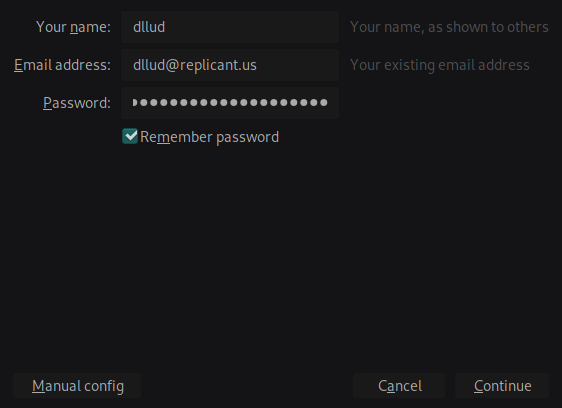
- Click
Manual config. - Fill out the server info like this:
Incoming:IMAP imap.replicant.us 143 STARTTLS Normal password
Outgoing:SMTP smtp.replicant.us 25 STARTTLS Normal password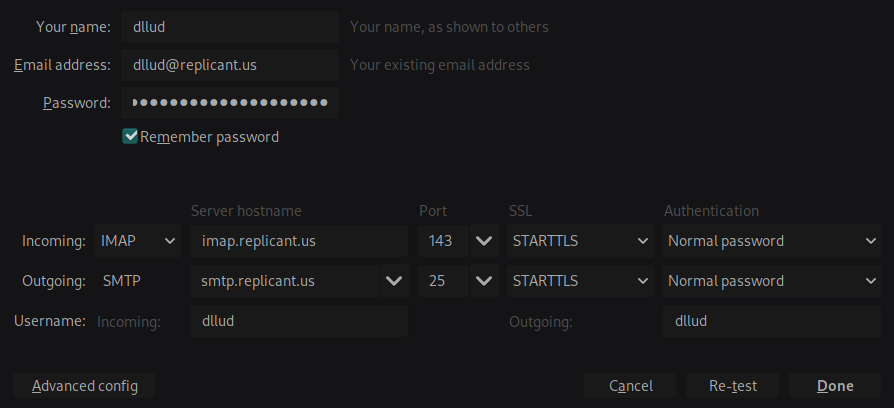
Yes,STARTTLSis not the correct SSL method for Replicant email servers. Unfortunately this wizard does not allow choosing port 143 in combination with theSSL/TLSmethod. We'll change this later.
Also, the STMP server does not exist, as Replicant does not allow sending email through their servers. But you must proceed like this, as Thunderbird requires one SMTP server for each account. - Click
Advanced config. A new account will be created. You should be able to see it in theAccount Settings. - Restart Thunderbird.
- Open again the
Account Settings. In theServer Settingsfor this new account selectSSL/TLSin theConnection security. - Thunderbird will change the port to
993. Click on it and set to143. ClickOK.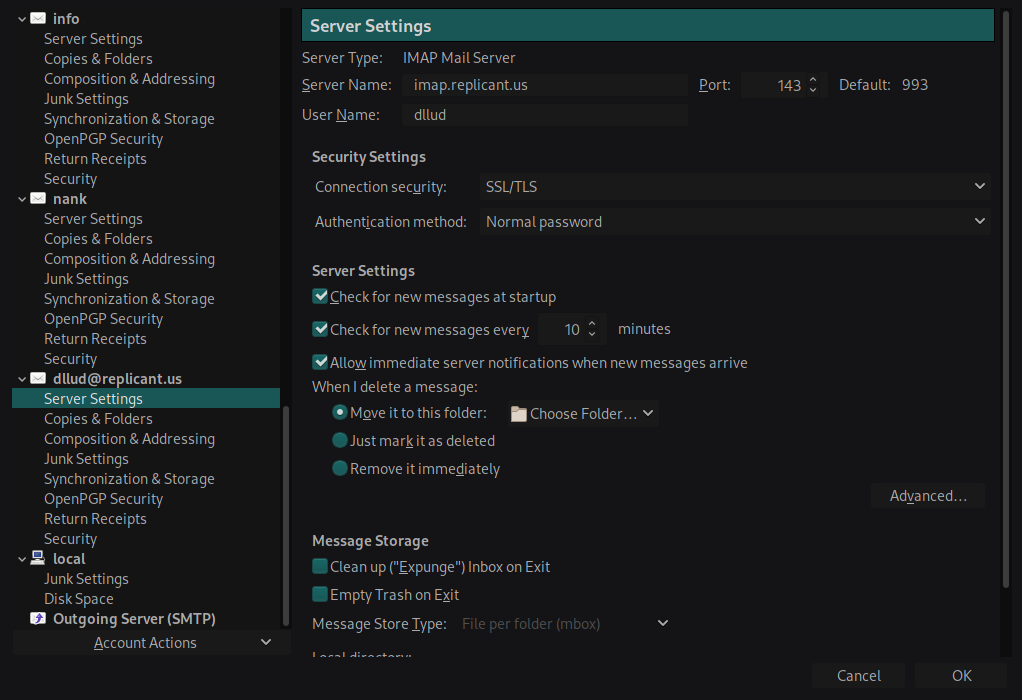
- Restart Thunderbird.
- Upon restart Thunderbird should be able to fetch your emails. You can double check if port
143is still configured in theServer Settings.
KH Updated by Kurtis Hanna about 6 years ago
I can confirm that David's workaround worked for me successfully. When I logged in I had two emails in my inbox from Denis.
_R Updated by _I3^ RELATIVISM over 5 years ago
- Type of work Any programming languages (scripts, C, etc), System administration added
DC Updated by Denis 'GNUtoo' Carikli about 5 years ago
- Parent task deleted (
#2031)
DC Updated by Denis 'GNUtoo' Carikli over 2 years ago
- Priority changed from Normal to Low
- Target version set to Infrastructure
Actions